Case study
Roban – Upgraded shopping experience through content strategy and UX/UI design
The client
Established in 2000, Roban is one of the two authorised importers in Poland of Düfa and Profitec paints, plasters, varnishes and construction chemicals from the German manufacturer Meffert AG Farbwerke. It sells to wholesale and retail customers.
Visit roban.com.plThe challenge
The existing store was built on Comarch e-Sklep, a dedicated online store solution for the ERP in use. Since the launch in 2022, it was rarely updated beyond order fulfilment. Online sales were a small share of revenue, with no year-over-year growth. Paid campaigns brought traffic, but not new customers.
The setup proved difficult to maintain:
- Category and product data was fed directly from the in-house ERP, where each product variant is a separate entry that has to be updated with every content change.
- The customised Liquid templates, edited directly in the admin panel, hadn’t been updated since the initial release, missed newer platform features and had no version history.
My approach
My role covered both discovery and delivery: auditing the existing store, proposing the new platform setup and taking ownership of the execution – from content strategy and UX/UI design to front-end development and coordinating the back-end work with external developers.
Based on the store audit and stakeholder interviews, I defined the goals for the new solution. It needed to:
- Make it easier for customers to find and choose the right product, with richer product content and a better checkout flow.
- Move catalog management to the store, with attributes, configurable products and access for external editors.
- Keep the ERP as the source of truth for prices and stock.
- Improve on-site SEO, GEO and mobile performance.
- Support continuous improvement through new features and data-driven iterations.
Delivery
The new store launched on 20 July 2026 on Magento 2, with a custom Hyvä-based theme I designed and developed. Key results so far:
- 518 product pages consolidated into 163 products with structured product data.
- Mobile Lighthouse performance score improved by 65%.
- Organic search sessions up 14% from August to September.
- Standalone calculator pages bringing in traffic from Google search.
- First visits from AI assistants such as ChatGPT.

Behind the scenes
Content strategy
Challenge
Right from the initial store audit and stakeholder interviews, there was a clear problem with the catalog. Because every ERP variant became its own page, a single product with pack size and colour variants could appear on up to 33 pages. Customers browsing a category had to compare near-identical pages to find the right variant, and every content update had to be repeated for each one.
Solution
I restructured the catalog around products instead of variants: one product page, with pack size, colour and finish as options. Content, attributes and categories moved to Magento, while the ERP stayed the source of truth for prices, stock and order data.
To make this process efficient for over 500 product variants, I used Claude Code to export each page to a JSON file with its content, URL and ERP ID, group the files into products, and turn each group into a configurable product whose variants hold only price, pack size, colour or finish.
After assigning categories, I defined a content model for the product page: a description improved with keyword research through the Senuto API, technical attributes, surface preparation, safety information and related products, none of which the old store had. The new content was extracted from the manufacturer’s technical and safety data sheets, which until then were only available as PDF downloads.
Result
518 product pages became 163 products. Customers choose a variant instead of comparing near-identical product cards and pages, and content is updated once per product.

Behind the scenes
UX/UI design
Challenge
With the new catalog in place, the category and product pages had the most potential to improve the experience in the first release. Two decisions had to be made early: what information the category product card and the product page should hold, and which product page features to prioritise for the first release.
Solution
Based on the available data and the product range, I defined two customer types to guide the design choices. Both are also represented in the home page visuals.
I started the UI with the densest component instead of the home page: the product card in the category grid. Both customer types needed more information than a standard card shows, so the question was how much the card could hold before it became too busy and hard to scan. The design decisions made there became the foundation of the design system.
Result
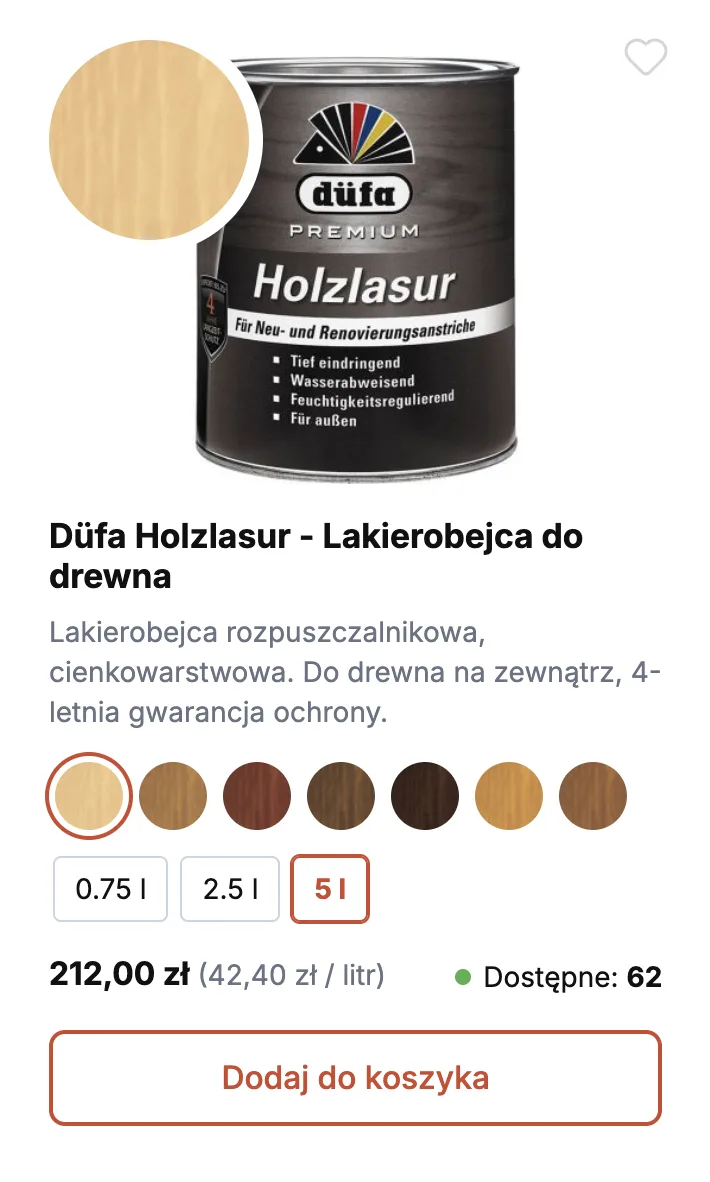
The final card maps each element to a need from the table: the short description helps homeowners search by use, the variant selectors let professionals add a known product without opening its page, and price per litre, exact stock and a large colour preview appear once a variant is selected. The price excluding VAT moved to the product page to keep the card readable.
The product card set the patterns for the product page: the same variant selectors, price and stock components. The page then adds what the card leaves out: detailed product data from the technical data sheets, prices excluding VAT, CRO best practices like the delivery date and shipping cost, and two new features: consumption calculators and the custom paint colour palette with a quote request.
Default card
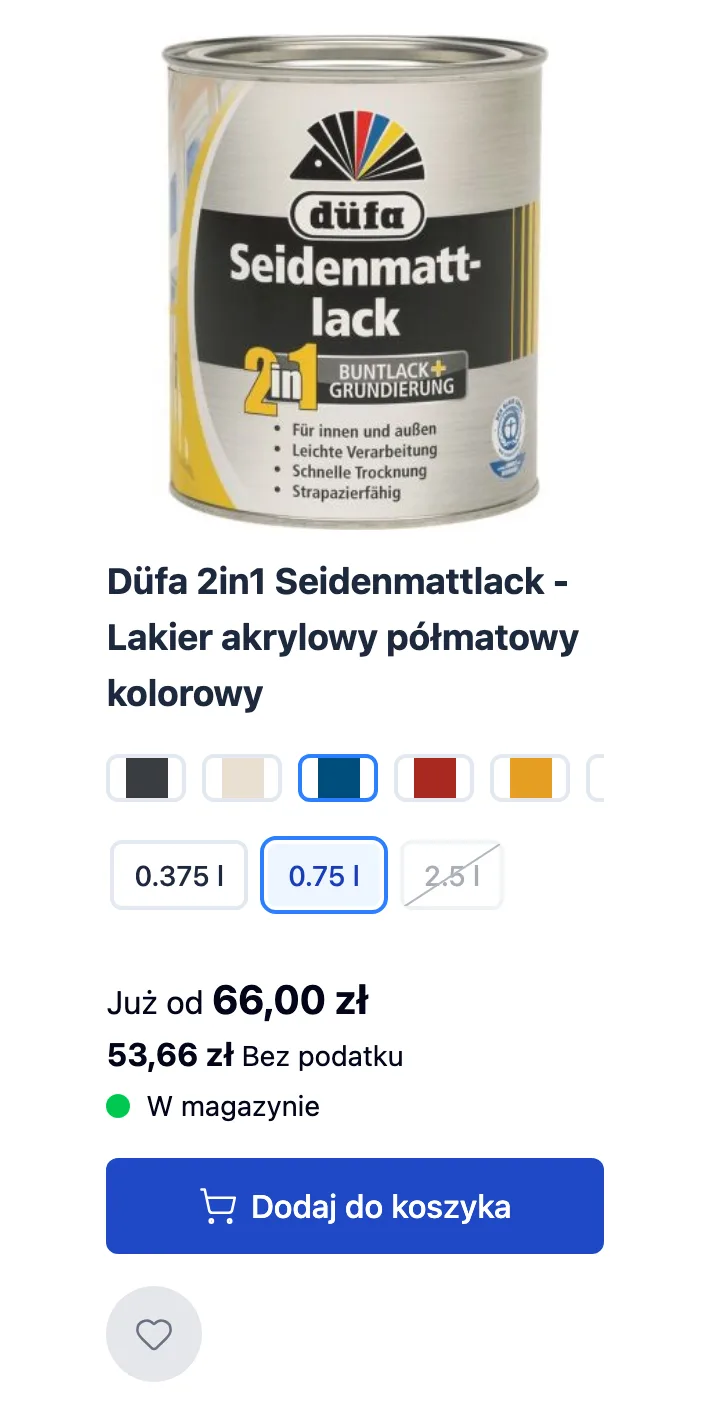
The default Hyvä card for a configurable product, with a variant selected. Unavailable sizes are crossed out, but after selection the “from” label stays, the price excluding VAT sits under a generic “without tax” label, and stock shows only in stock or not. There’s no short description to tell similar products apart.
Concept 1
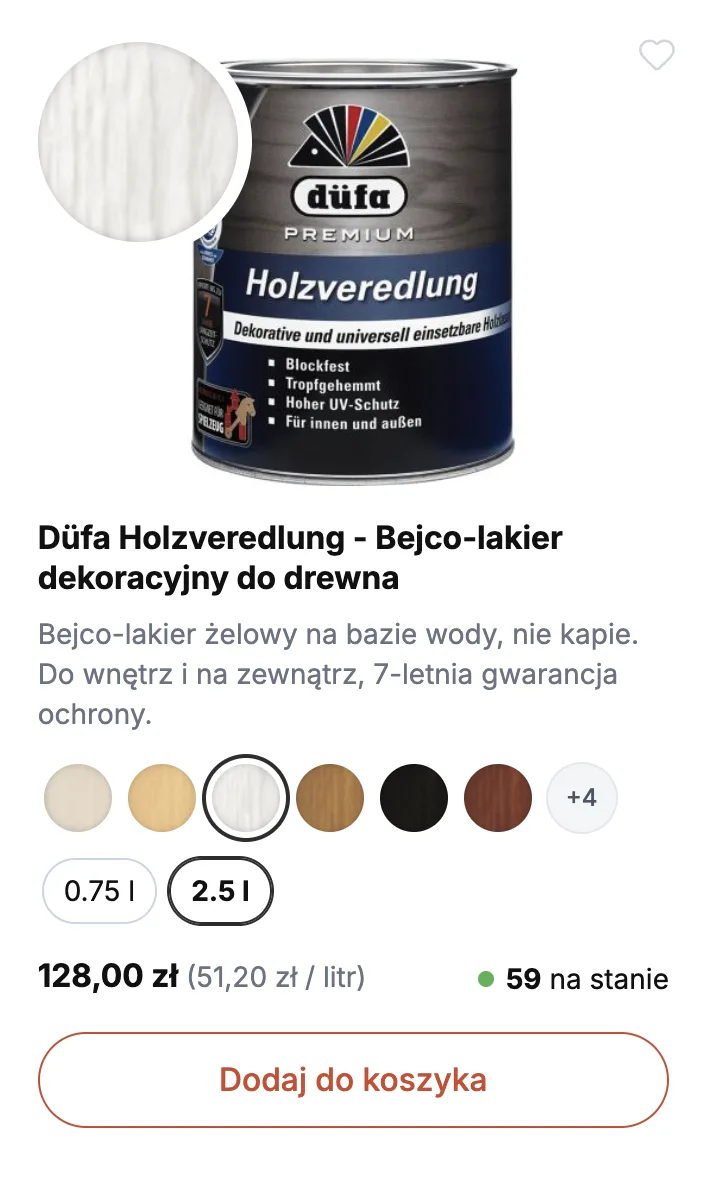
All candidate data on one card: a short description, round swatches with a large preview of the selected colour, prices incl. and excl. VAT, price per litre for both, and exact stock. It covered both customer types, but with two prices and two prices per litre, the price area became the hardest part to scan.
Concept 2
The price excluding VAT and its price per litre moved to the product page, leaving one price per card and keeping it easy to scan. The accent colour moved from Roban’s brand orange, which doesn’t pass WCAG AA contrast, to the closest AA-compliant shade, which still reads as orange-red rather than brown.
Final card
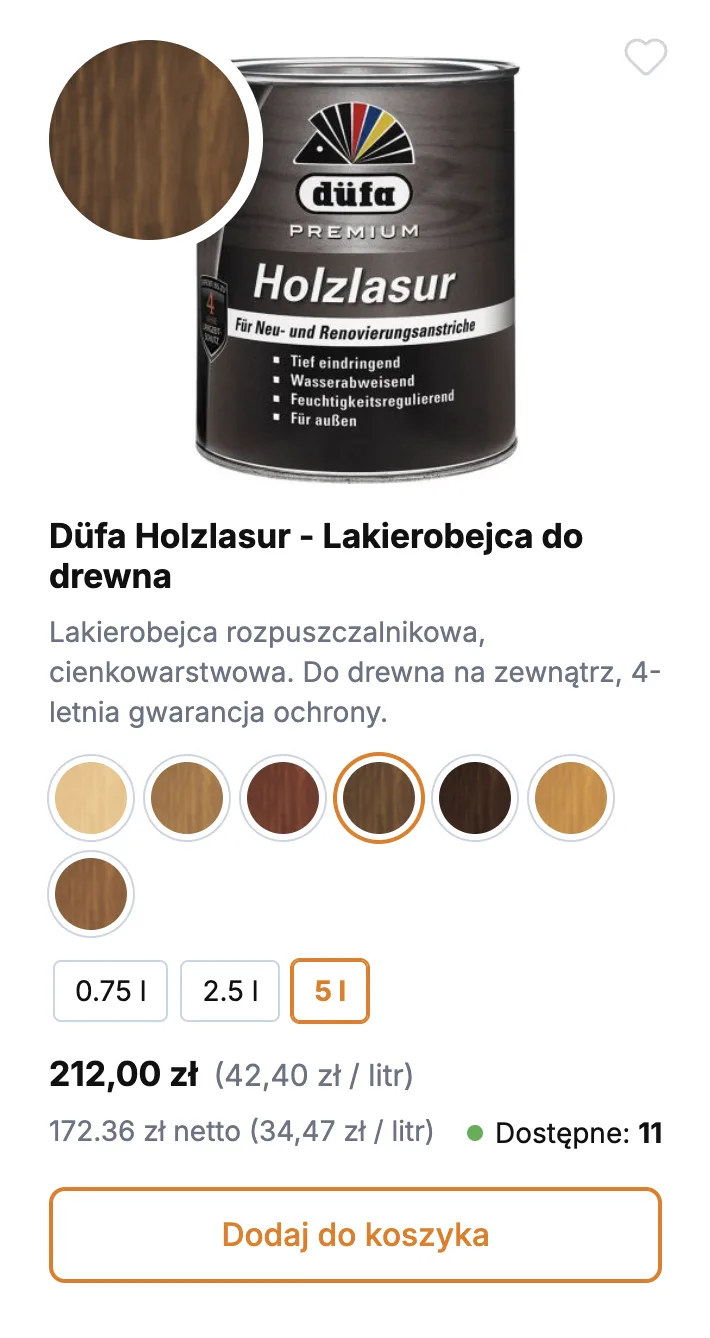
Once a variant is selected, the exact price replaces the “from” label, with the price per litre beside it, and stock shows the exact quantity. A large preview shows the selected colour, swatches fit one row with a “+4” overflow, and a subtle shadow on every swatch helps near-white colours stand out. Microcopy and spacing were also refined.
Behind the scenes
CRO
Challenge
The store audit showed that the free shipping threshold wasn’t prominent across the site, and the order data confirmed it: customers wouldn’t add small add-ons, like paint brushes or rollers, to reach free delivery.
The threshold appeared only in a home page banner below the fold, in the delivery cost modal on the product page, and on the shipping costs and options page.
Solution
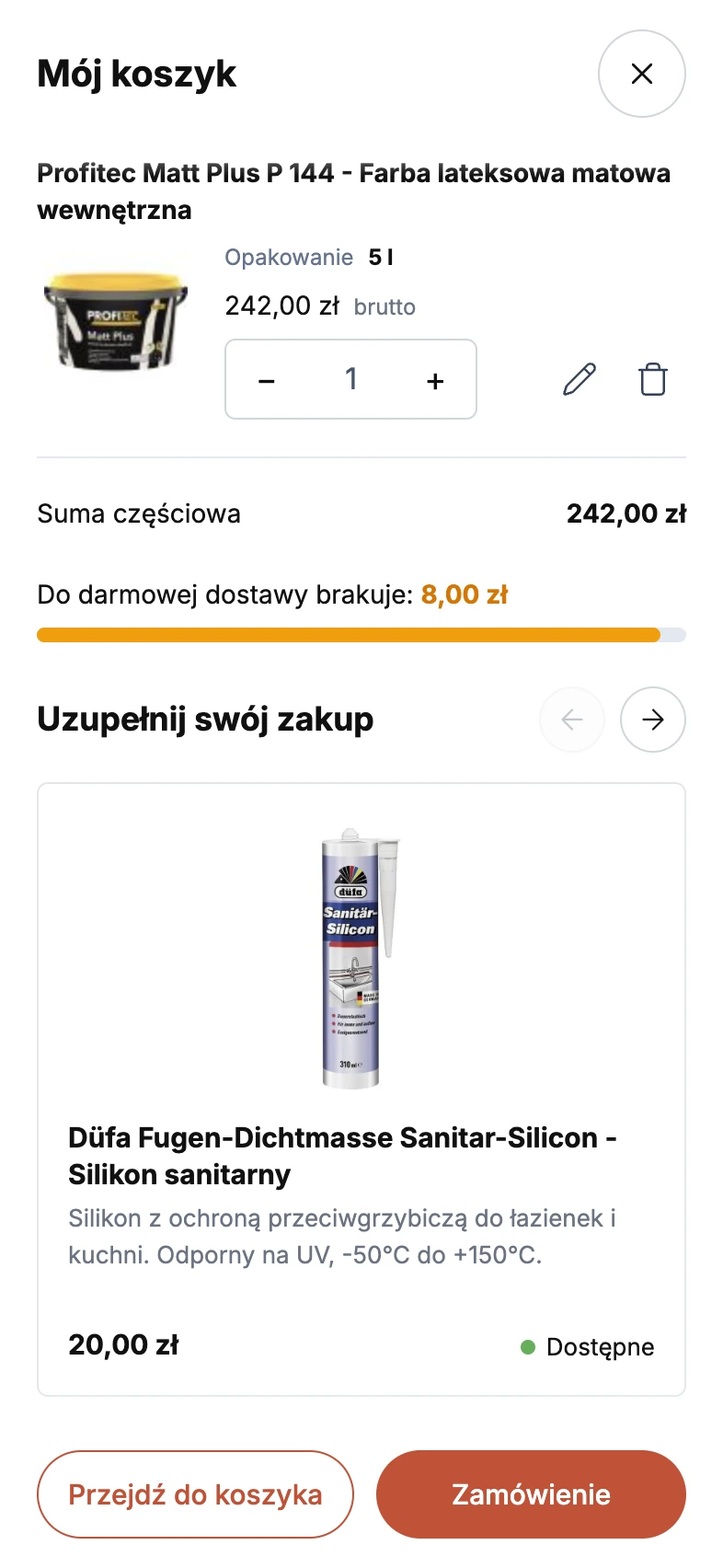
I made the threshold visible at every step of the purchase flow, through microcopy and new features:
- Every page: free delivery from 250 zł in the store features bar below the header.
- Product page: the shipping cost, updated based on the product price, together with the delivery time.
- Mini cart and cart page: a free shipping progress bar and a carousel of product add-ons.
- Adding to cart opens the mini cart drawer instead of the standard success message.
Result
Customers now get clear information about the delivery cost and the free shipping threshold across the entire purchase flow, along with add-ons often needed for the job, like brushes, rollers or sealants.